Main navigation
MOBILEFISH.COM
Home
Shop
Contact
Emulators
Tutorials
Developer
Services
Mobile
Games
Login
Legal
Tutorials
section navigation
3D Studio Max
Abbreviations
ADSL installation
Advertising programs
for publishers
BitComet
BTW
Character Encoding
Quick Guide
Chinese
Cascading Style Sheet Quick Guide
Top Level Domain
Country Codes
Language Codes
Country Currency Codes
Country Language Codes
Design Patterns
Faucet ceramic cartridge
HomeSite
How to use JDBC
How WAP works
How to serve midlets
on a web server
How to serve WAP docs on a web server
HTML Quick Guide
HTTP error codes
J2EE deployment descriptors
Java Pet Store Tutorial
Java Quick Guide
Javascript
Reference Guide
JSP Quick Guide
Linksys Wireless Access Point Router with 4-Port Switch (BEFW11S4 ver. 3)
Linksys Wireless Network PC Card (WPC11 ver. 3.0)
Mac OS
MIDI
Mime types
Model View Controller Explained
PDF
Plesk
QR code
RTTTL
Search Engine Optimisation Quick Guide
Software drivers
Software Licenses
Theory of computation
UML Reference
Unix
Web development process
Web service
Whois servers list
Windows Quick Guide
XHTML Quick Guide
XPath
XSLT
Show more ▼
Print this page
Cascading Style Sheet Quick Guide
This guide contains information how to create Cascading Style Sheets (CSS).
More information about CSS can be found at:
http://www.w3.org/Style/CSS/
Quick guides
CSS syntax
Using a stylesheet file
Embedded styles
Highlight text
Convert px pt font size
Style order
Div style attribute
Div examples: borders and corners
Div examples: buttons
Div examples: containers
Div examples: forms
Div examples: graphs
Div examples: images
Div examples: fluid layouts
Div examples: links
Div examples: horizontal menus
Div examples: vertical menus
Div examples: others
Div examples: scrollbars
Div examples: tables
Div examples: texts
Div examples: fluid layouts
Information
All examples are working for IE 6.0 and Firefox 1.5.
Procedure
Example
Screenshot
Example 1
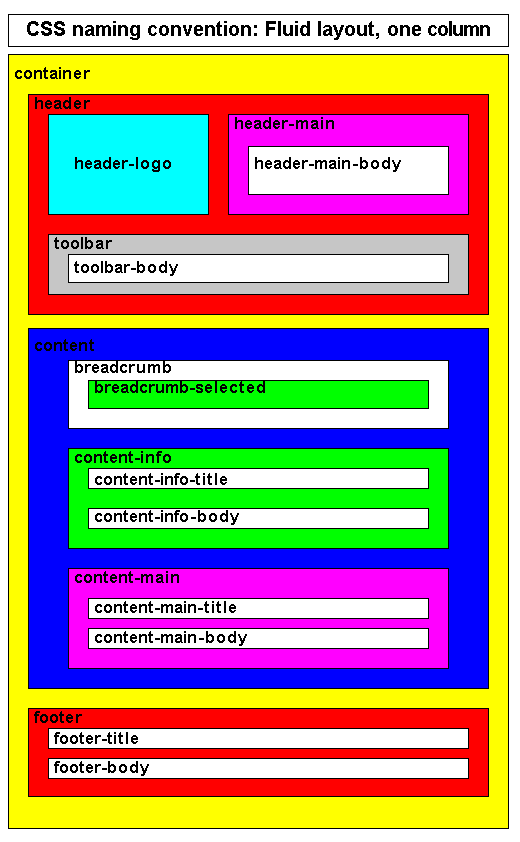
Fluid layout: One column
Download CSS fluid_layouts.zip.
View the CSS naming convention used for this layout.
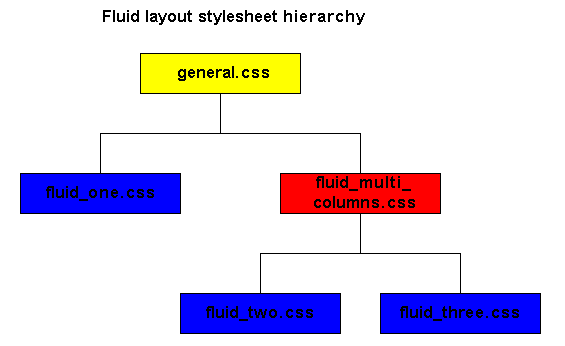
View the CSS stylesheet hierarchy.
Note:
All px units are converted into em.
To convert: em = px / 16
10px is 10/16 = 0.625em
Example 2
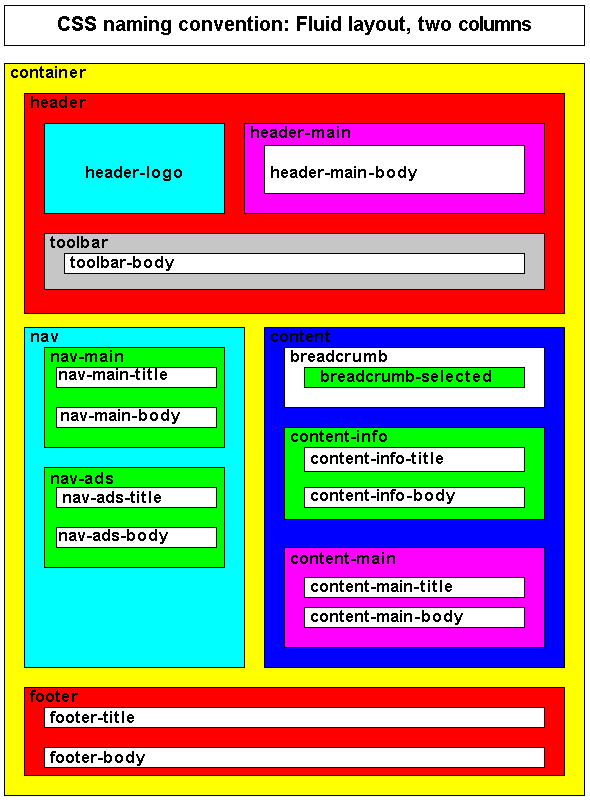
Fluid layout: Two columns.
Download CSS fluid_layouts.zip
.
View the CSS naming convention used for this layout.
View the CSS stylesheet hierarchy.
Note:
All px units are converted into em.
To convert: em = px / 16
10px is 10/16 = 0.625em
Example 3
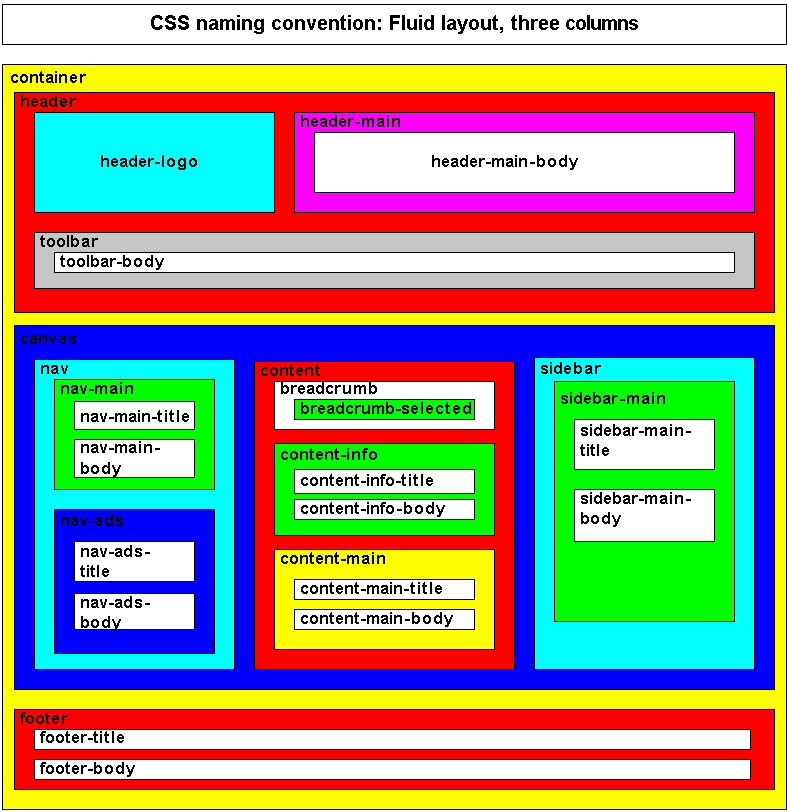
Fluid layout: Three columns.
Download CSS fluid_layouts.zip.
View the CSS naming convention used for this layout.
View the CSS stylesheet hierarchy.
Note:
All px units are converted into em.
To convert: em = px / 16
10px is 10/16 = 0.625em
<a href="../../cache/comments/css_quickguide_div_examples_fluid_layouts.html">Posted comments</a>
<a href="../../customer/tmp/poll/poll.html">Poll</a>