Utlities for C++ development
Information
If you are using the eclipse
IDE with the C/C++ plugin installed you need the following
Cygwin utilities for C++ development:
Operating system used
Windows XP Home Edition Version 5.1 SP 2
Software prerequisites
Cygwin
Procedure
- To install the g++ compiler and make tool, follow the same procedure mentioned above starting from step
12.
- The g++ compiler and make tool can be found under category: All | Devel
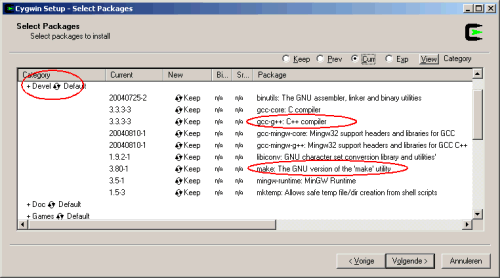
- To verify if the utilities are installed, type:
g++ --version
You should see:
g++ (GCC) 3.3.3 (cygwin special)
Copyright (C) 2003 Free Software Foundation, Inc.
This is free software; see the source for copying conditions. There is NO
warranty; not even for MERCHANTABILITY or FITNESS FOR A PARTICULAR PURPOSE.
make --version
You should see:
GNU Make 3.80
Copyright (C) 2002 Free Software Foundation, Inc.
This is free software; see the source for copying conditions.
There is NO warranty; not even for MERCHANTABILITY or FITNESS FOR A
PARTICULAR PURPOSE.
|
